Yacht Lead Source Tracking, From the First Click to the Sale.
Is YachtWorld worth it next to Boat Trader, or next to your own website? Lead counts don’t answer that; deals do. Every inquiry in YachtOne keeps where it came from, every deal opened from it stays linked to it, and Analytics shows which sites send visitors who become buyers.
Most count the leads. Fewer count what they turn into.
The Marine Retailers Association of the Americas surveyed more than 206 marine businesses across North America for its 2025 Digital Marketing Survey. The gap it found between tracking where a lead came from and tracking whether it converted is the same gap behind every “is this portal worth it?” argument.
- 75%of dealers track the lead source
- 60%track conversions
- 18%don’t measure online marketing success at all
In the survey’s open answers, dealers named very different winners:
- “Boat Trader. By far the most leads”
- “FB Marketplace, sell 80% from there”
- “Website is still king in my book”
- “Not sure, can’t quantify what works best”
Source: MRAA, 2025 Digital Marketing Survey report. The answer depends on the business, which is why the useful number is your own.
Website visits and inquiries are counted separately.
A YachtWorld lead delivered straight to your CRM never visits your website. A buyer who clicks from a portal listing to your site and fills in your form does. YachtOne keeps both counts, so neither one hides the other.
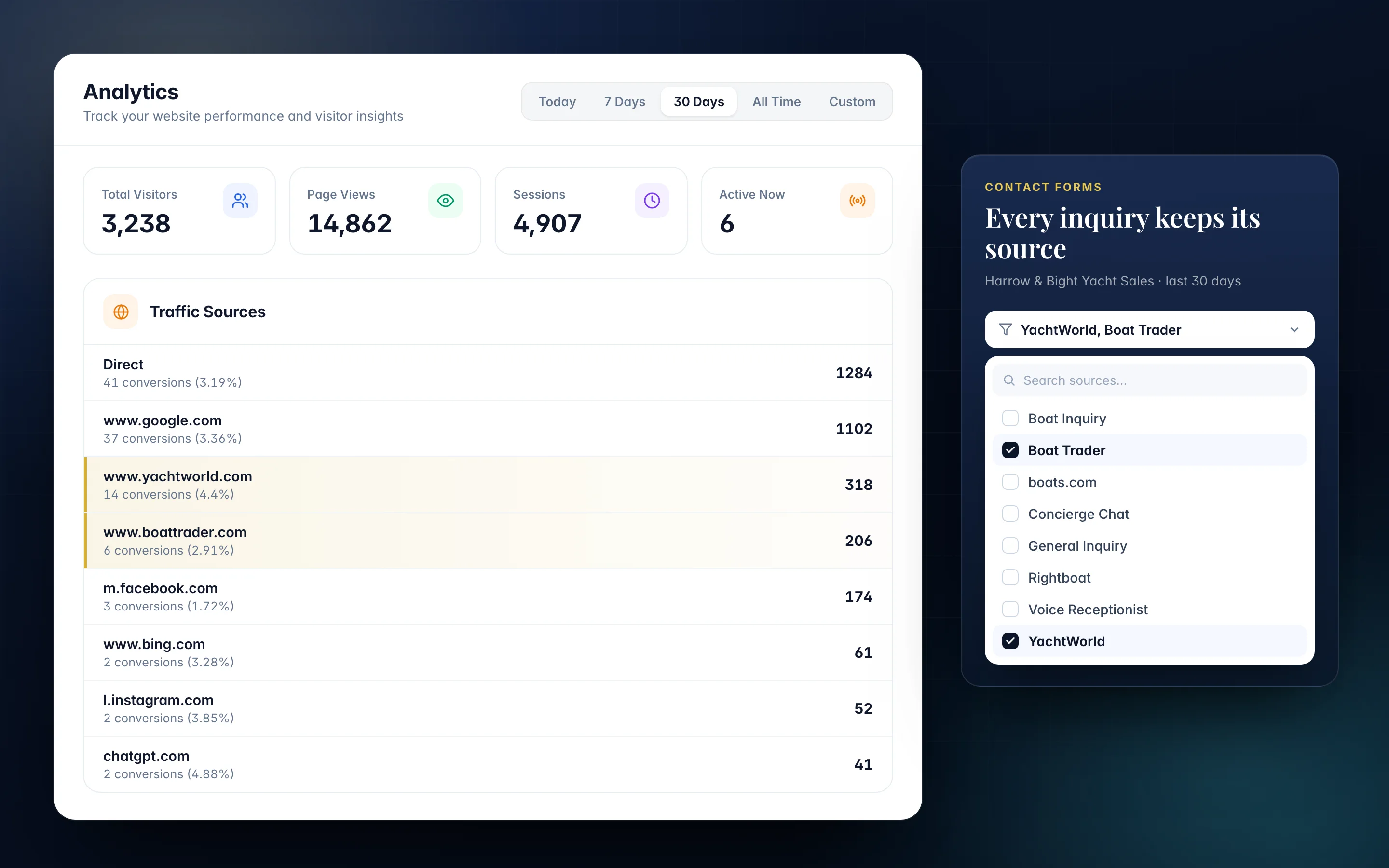
Visitors, by the site they came from
Everyone who reached your website, grouped by the site that sent them on their first visit: www.google.com, www.yachtworld.com, m.facebook.com, or Direct. Next to each, how many became a known contact and what share that is.
Inquiries, by how they reached you
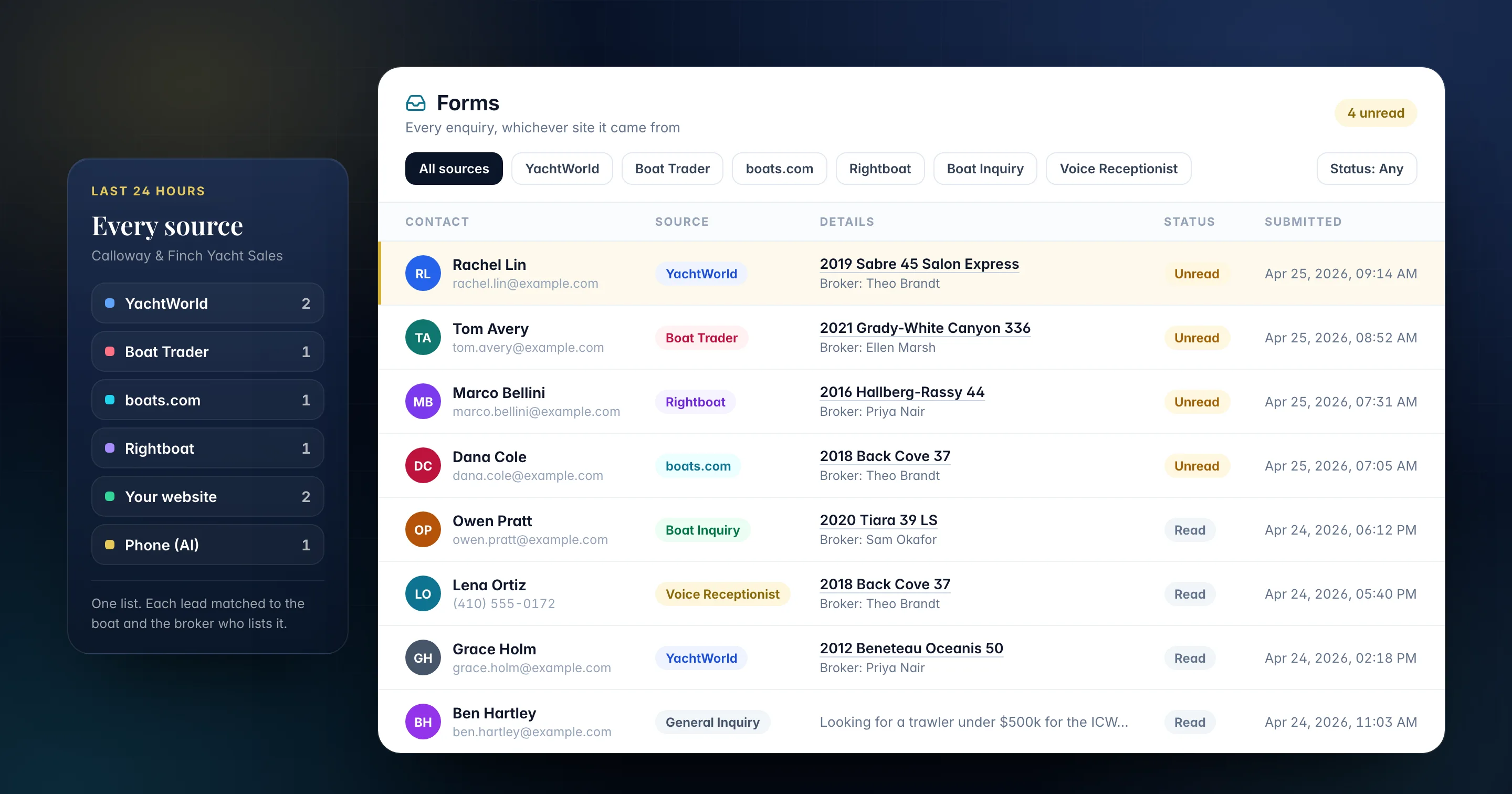
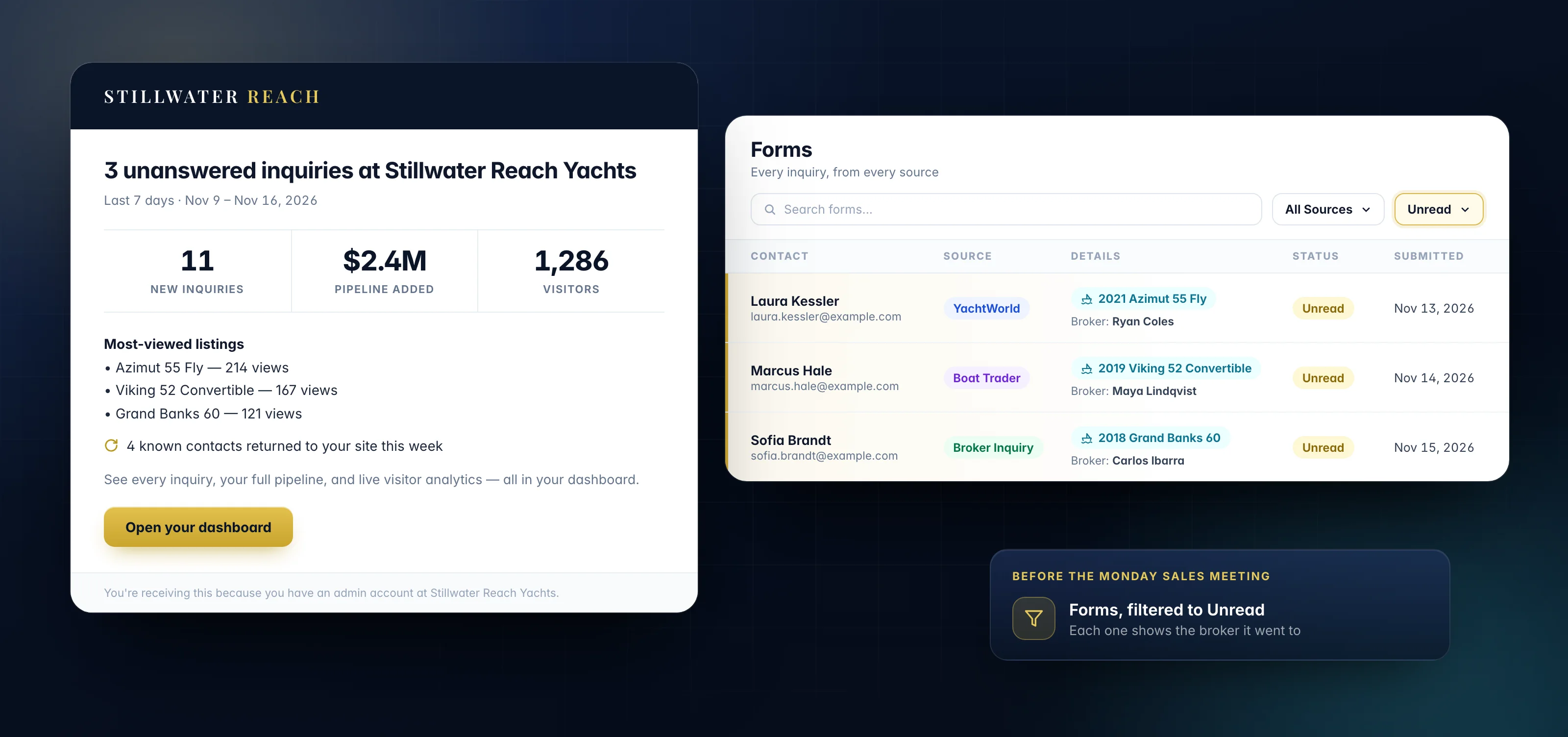
Every inquiry keeps its source: YachtWorld, Boat Trader, boats.com, Rightboat, a form on your site, the chat concierge or the AI receptionist. Filter by one or several and the list narrows to those.
From a Google search to a sold trawler.
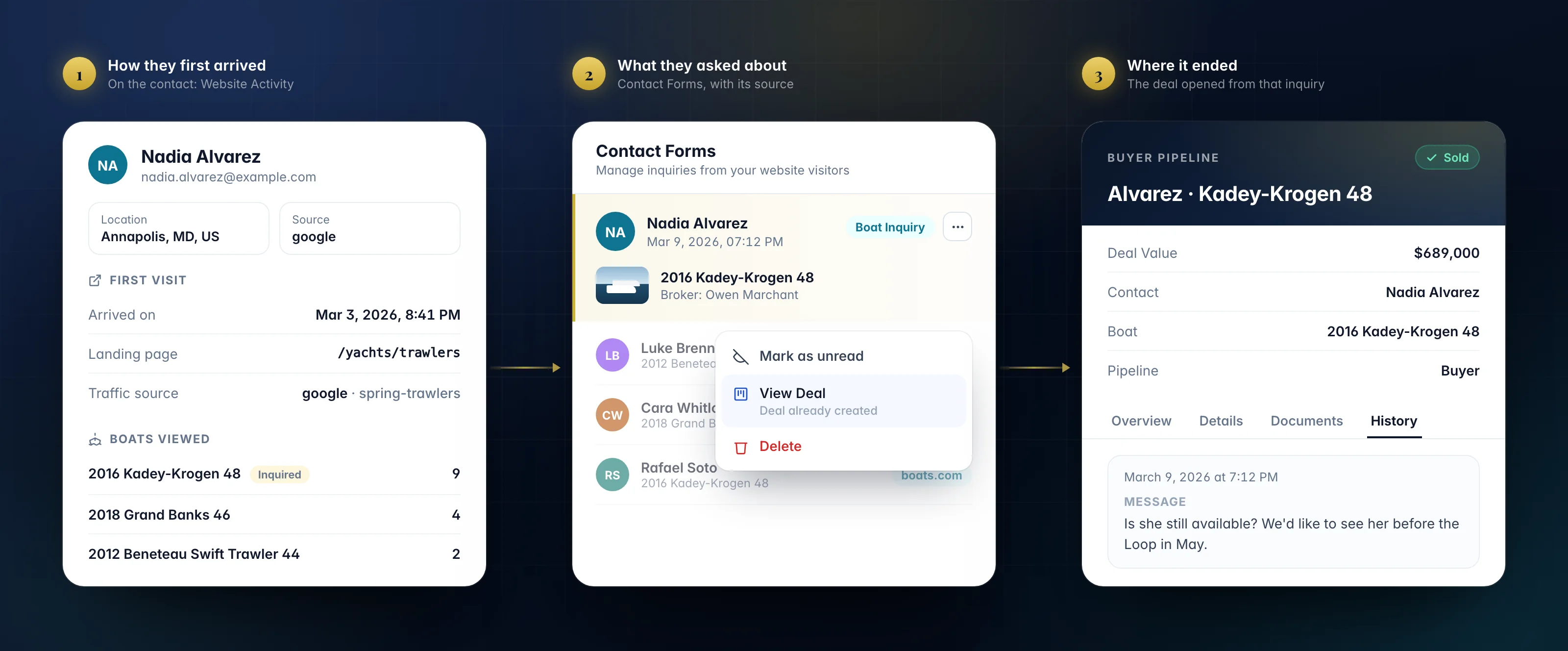
- 1
How they first arrived
On the contact: the date of the first visit, the page they landed on, and the traffic source, with the campaign name when the link carried UTM tags.
- 2
What they asked about
The inquiry, with its source, the boat and the broker. A deal opened from it shows as View Deal on that inquiry.
- 3
Where it ended
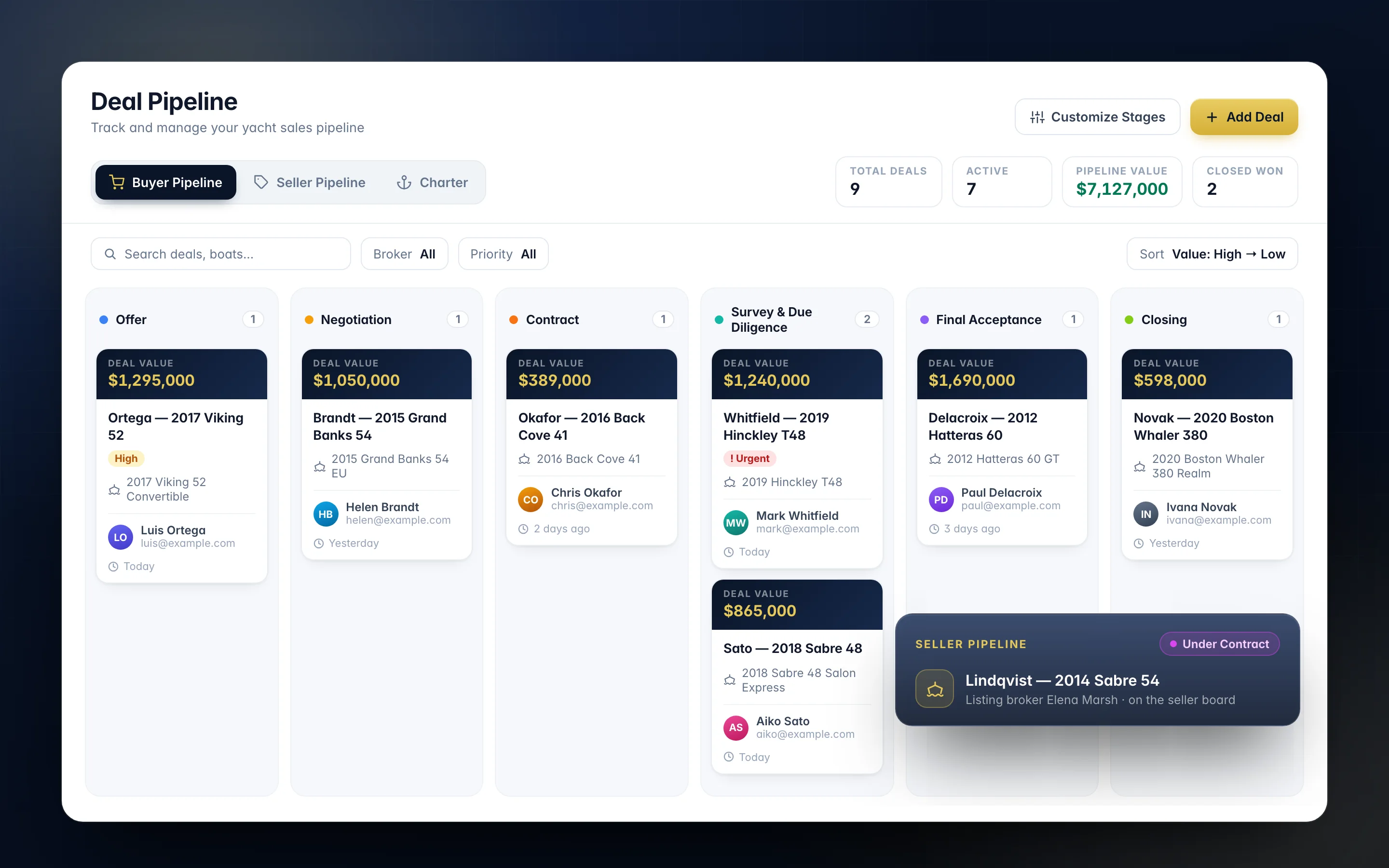
The deal keeps the inquiry it came from in its History tab, so a sale can be walked back to the site that started it.
Renewal time: count it in three steps.
Filter Contact Forms by source
Pick YachtWorld, or Boat Trader, or your own website forms.
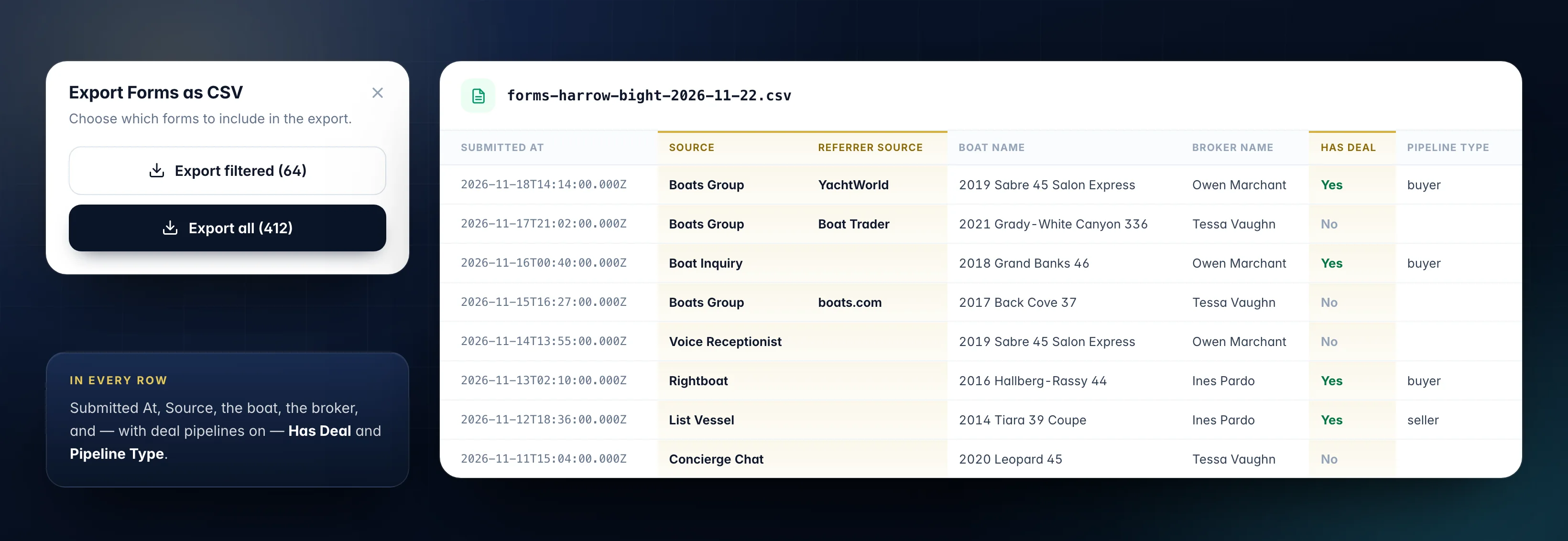
Export filtered
A CSV of those inquiries with Source, Referrer Source, boat, broker, Has Deal and Pipeline Type.
Count, then add your costs
Inquiries and deals per source, next to what each portal costs you a year. The invoices are yours; the counts are here.
Portal leads export with the source Boats Group and the portal itself (YachtWorld, Boat Trader, boats.com) in Referrer Source. Has Deal and Pipeline Type need deal pipelines, in the Full Platform.
What it counts, and what it doesn’t.
There is no built-in report of sold boats or commission by source. The links are on every record; the total is a spreadsheet away.
Has Deal in the export means a deal was opened. Whether it sold is the stage on that deal.
A deal added by hand, without an inquiry behind it, has no source.
Calls a person answers on your office line aren’t tracked. Calls the AI receptionist takes are.
Portal-side numbers (listing views, impressions, what you pay) stay in the portal. YachtOne sees the inquiries and the website visits.
Website visitors are recognised by browser, so a buyer on a new phone looks like a new visitor until they identify themselves again.
Everything Else You Might Ask.
How do I know whether YachtWorld or Boat Trader is worth what I pay?
Count what each one sends you all the way through, not just the leads. In YachtOne every inquiry keeps the site it came from, so you can see how many came from YachtWorld, Boat Trader, boats.com, Rightboat, your own website, the chat concierge or the AI receptionist. When a broker opens a deal from an inquiry, the deal stays linked to it.
Put the number of inquiries and the deals that came from them next to what you pay that portal each year, and you have the comparison. We don't hold your portal invoices, so the cost side is yours to add.
Can YachtOne show me closed deals by lead source?
Not as a ready-made report. Each deal opened from an inquiry links back to that inquiry and its source, and the Contact Forms export lists every inquiry with its Source, whether it has a deal, and which pipeline. Filter by source, export, and count. That is a few minutes in a spreadsheet, not a dashboard.
The export says whether a deal exists, not what stage it reached. To count only sold boats, check the stage on those deals.
What is the difference between Traffic Sources and the source on an inquiry?
Traffic Sources, in Analytics, counts visitors to your website by the site they arrived from on their first visit: www.google.com, www.yachtworld.com, m.facebook.com, or Direct when no site was passed on. Next to each one is how many of those visitors became a known contact.
The source on an inquiry is how the inquiry reached you. A YachtWorld lead that Boats Group delivers straight to us never touches your website, so it appears on the inquiry and not in Traffic Sources. A buyer who clicks from a portal listing through to your site and fills in your form appears in both.
What counts as a conversion in Traffic Sources?
A visitor who became a known contact: they sent an inquiry, chatted their details to the concierge or created an account on your website. Anonymous browsing that never turns into a name is a visitor, not a conversion. The percentage is conversions divided by visitors from that site, in the date range you picked.
Do UTM tags on my ads and emails get picked up?
Yes. When a visitor first lands with utm_source and utm_campaign in the link, both are kept. On the contact's Website Activity you see the traffic source as that utm_source, followed by the campaign, for example “google · spring-trawlers”. They are stored in lower case. The Traffic Sources list itself groups by referring site, not by UTM.
What about buyers who just pick up the phone?
When the YachtOne AI receptionist takes a caller's details, the inquiry it files carries the source Voice Receptionist. Calls to your office line that a person answers are not tracked by YachtOne, so if you want those counted, ask the caller where they found the boat and note it on the contact.
Is anything double-counted when a buyer inquires through two portals?
Each inquiry is its own row with its own source, so a buyer who asks about the same boat on YachtWorld and then on your website shows as two inquiries, one per source. Both land on the same contact when the email address matches, so per source you are counting inquiries, not people.
Which plan includes this?
Lead Analytics and lead capture from YachtWorld, Boat Trader, Rightboat and others are included from Website + CRM, at $500 a month. Lead Analytics is a $150 add-on on the $350 Website plan.
Deal pipelines, and with them the link from inquiry to deal and the Has Deal column in the export, are in the Full Platform at $850 a month.
More problems we solve
Welcome to the First End-to-End Yacht Sales Operating System
We've built the only platform designed specifically for how yacht sales actually happen. From the moment a visitor lands on your site—they never leave your ecosystem.