Boat Show Lead Follow-Up: The 48 Hours After the Show.
Four days on the stand leave you with a scanner export, a pocket of business cards and a phone full of notes. Get every lead into the CRM that night with a broker’s name on it, on each broker’s task list the next morning, and answered with a real email about the boat they stepped aboard before the week is out.
- Import from .xlsx or .csv
- Leads split by broker as they come in
- No badge scanner needed
“So often your prospects drift away due to inconsistent or slow follow-up after your boat shows.”
In the MRAA’s January 2026 Marine Retailer Pulse report, most dealers called their show follow-up at least somewhat effective and a smaller share called it very effective. The dealers who described what works talked about speed: texting customers within an hour of them leaving the booth.
From the stand to the first email, hour by hour.
Five things have to happen, and each one has a place in the CRM. Miss one and the lead is a name on a spreadsheet nobody owns.
- Hour 0
On the stand
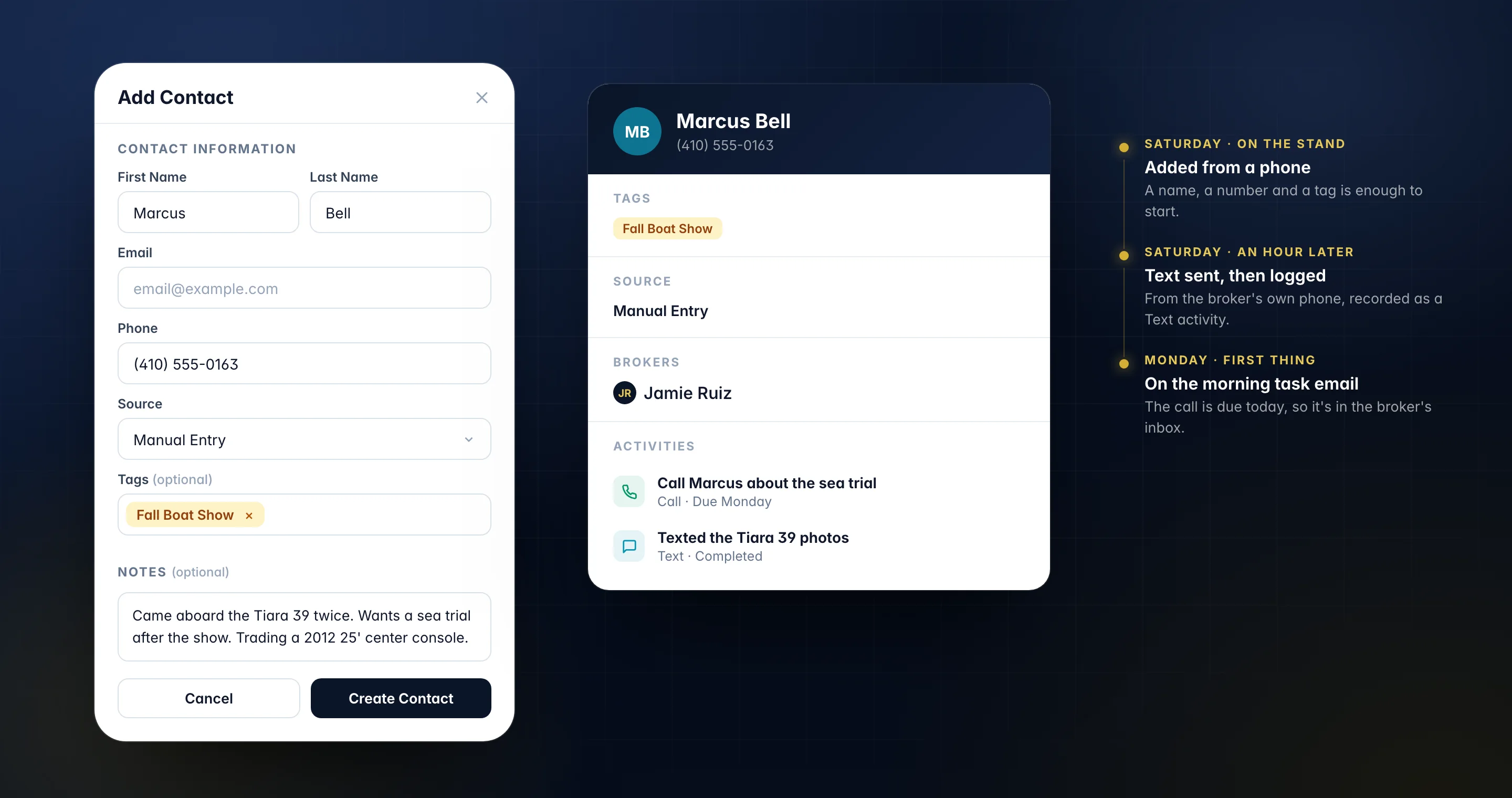
The broker adds the buyer from their phone with Add Contact: a first name and a number are enough, a tag for the show, and a line about the boat they stepped aboard. The contact is theirs from that moment.
- Within the hour
A text from the broker
Sent from the broker's own phone, then logged on the contact as a Text activity, with a call-back due date set while the conversation is still fresh.
- That night
The scanner list goes in
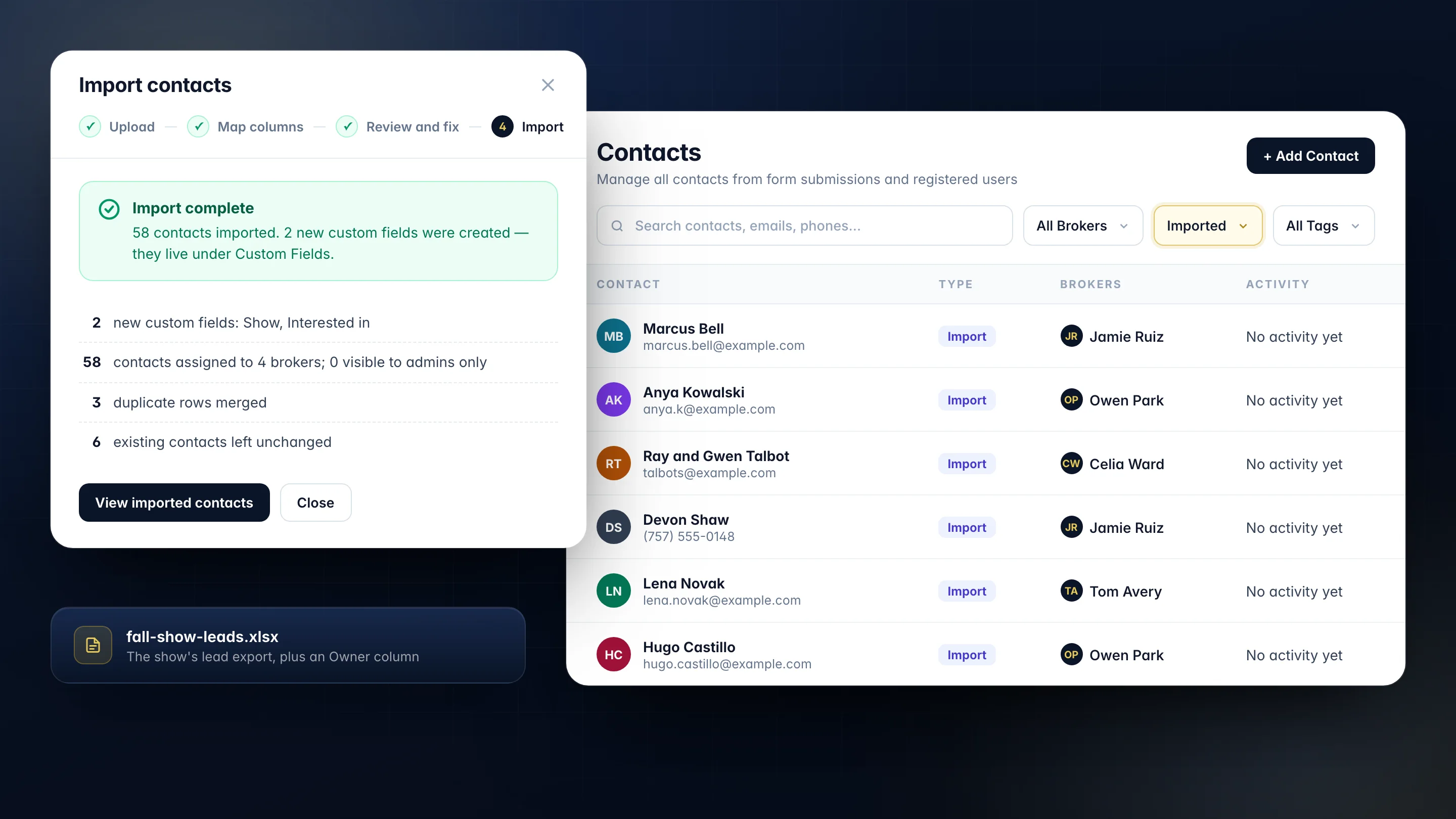
The show's lead export, as Excel or CSV, goes through Import contacts with an Owner column naming each lead's broker. Clients you already have are matched and left as they are.
- Next morning
On every broker's task email
Each broker's morning email lists what's overdue and what's due today, with the first call-backs by name and a link to their activities.
- By hour 48
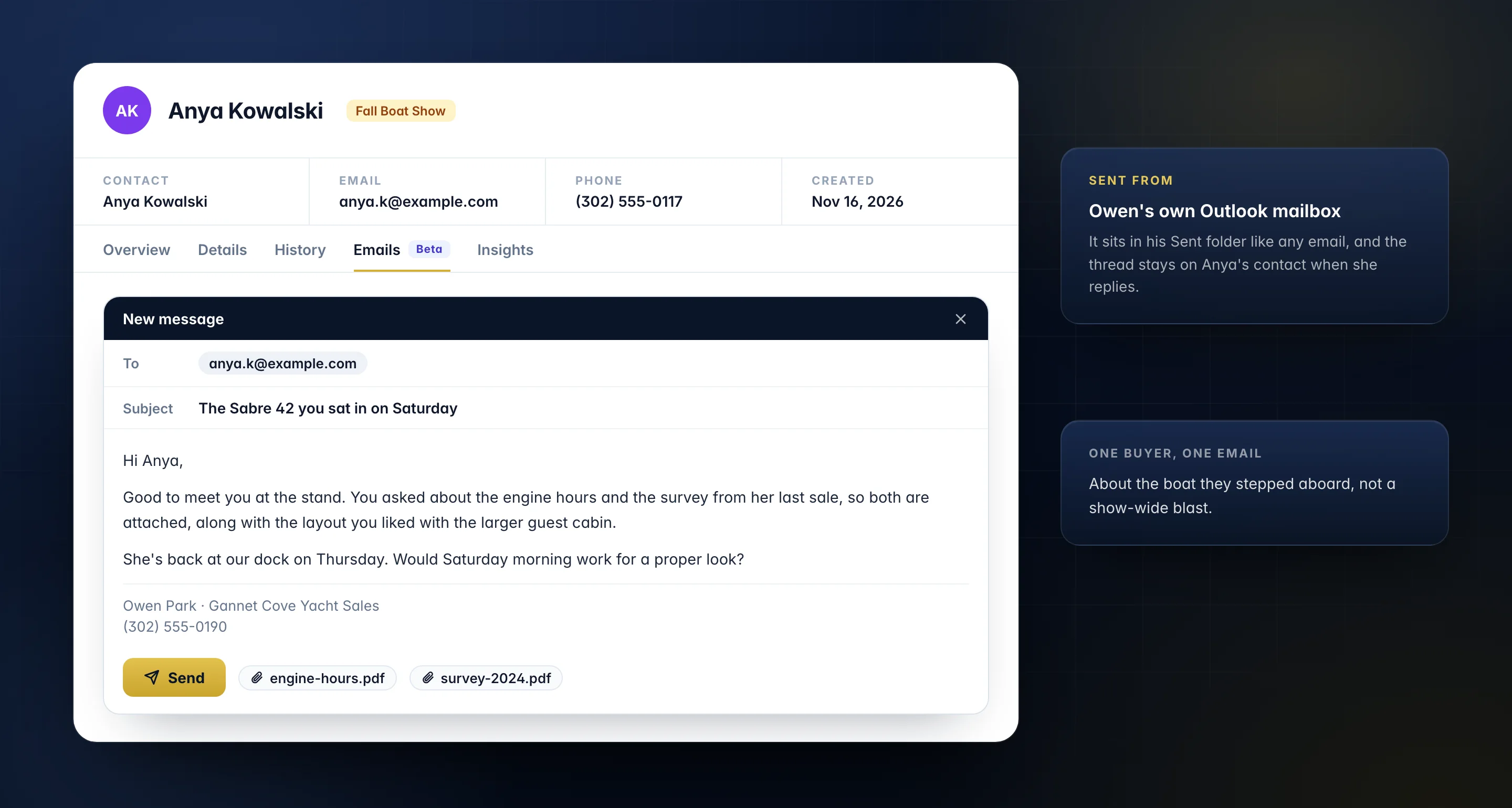
The first real email
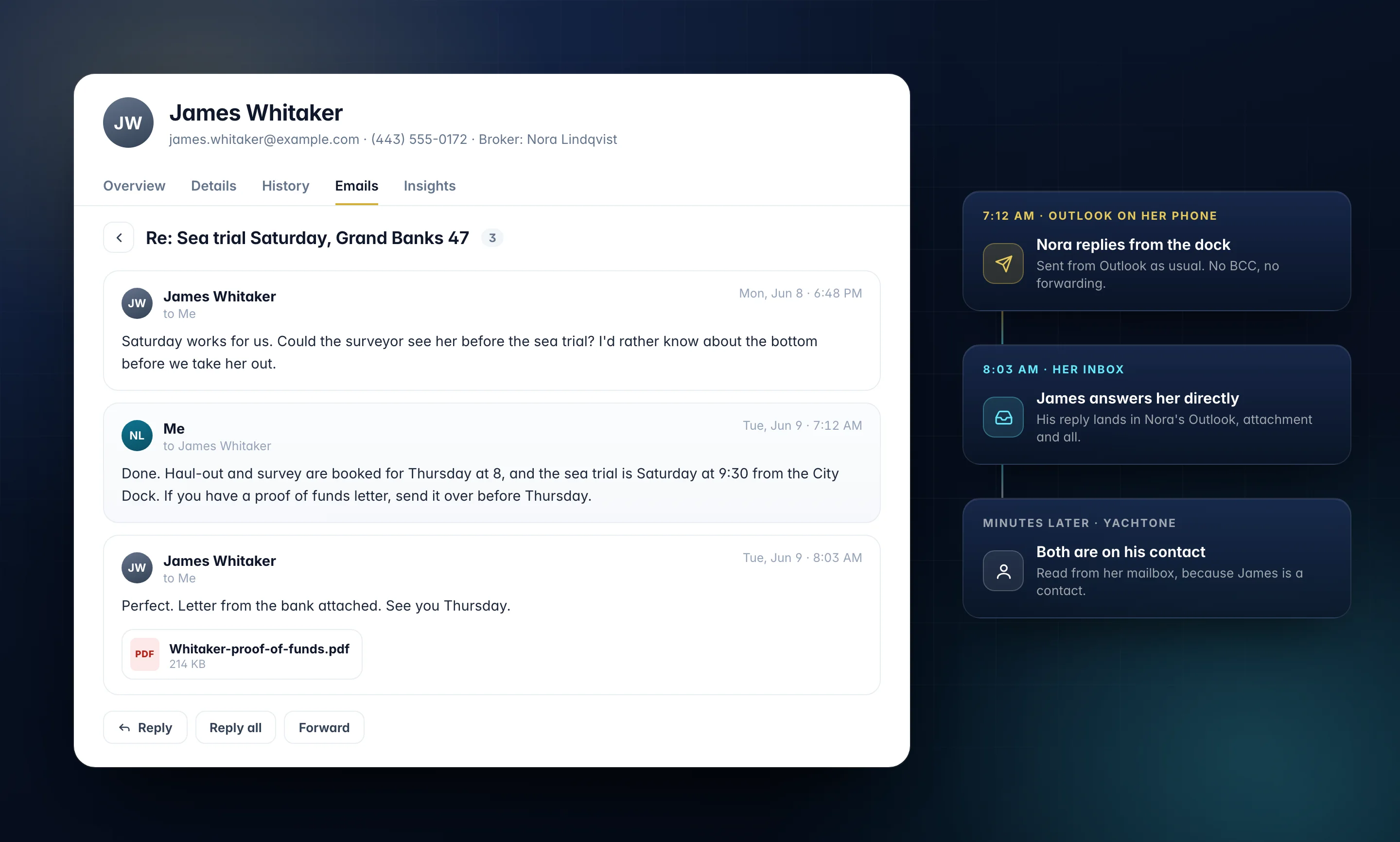
Written to one buyer about one boat, sent from the broker's own Outlook through the contact, and kept with the contact when the buyer replies.
The name you typed on the stand, and the list the scanner gave you.
Add Contact, from a phone
- A name and a phone number are enough to save someone
- Tag it with the show; the contacts list filters by tag
- Notes for the boat, the trade-in and the sea trial they want
- Attached to the broker who added it
Import contacts, that night
- Excel (.xlsx) or CSV, read in your browser and never uploaded
- An Owner column hands each lead to the broker who met them
- Existing clients matched by email and left unchanged
- Any extra column, such as the show, kept as a custom field
One buyer, one boat, one email.
A show-wide “thanks for stopping by” reads like everyone else’s. The email that gets a reply names the boat, answers the question they asked on board, and offers a time to see her again.
The broker writes it from the contact’s Emails tab, and it goes from their own Outlook mailbox, so it sits in their Sent folder like any other email and the reply comes back to them. The thread stays on the contact for whoever picks it up next.
Use the organiser’s lead retrieval at the booth and your own phone for texts. YachtOne is where the leads land, who owns them, and what’s due. See the Yacht CRM.
- Scan badges at the booth
- Send text messages
- Email every lead at once
- Push imported contacts to Mailchimp on its own
Everything Else You Might Ask.
How fast should a brokerage follow up boat show leads?
Faster than most do. The MRAA's boat show follow-up page puts it plainly: prospects drift away because follow-up after a show is inconsistent or slow. Dealers quoted from its January 2026 Marine Retailer Pulse report mention texting customers within an hour of them leaving the booth.
A workable rhythm is a personal text or call the same day, every lead in the CRM with a broker's name on it that night, and a real email about the boat they looked at within 48 hours.
Can we import the leads from the show's lead-retrieval app or badge scanner?
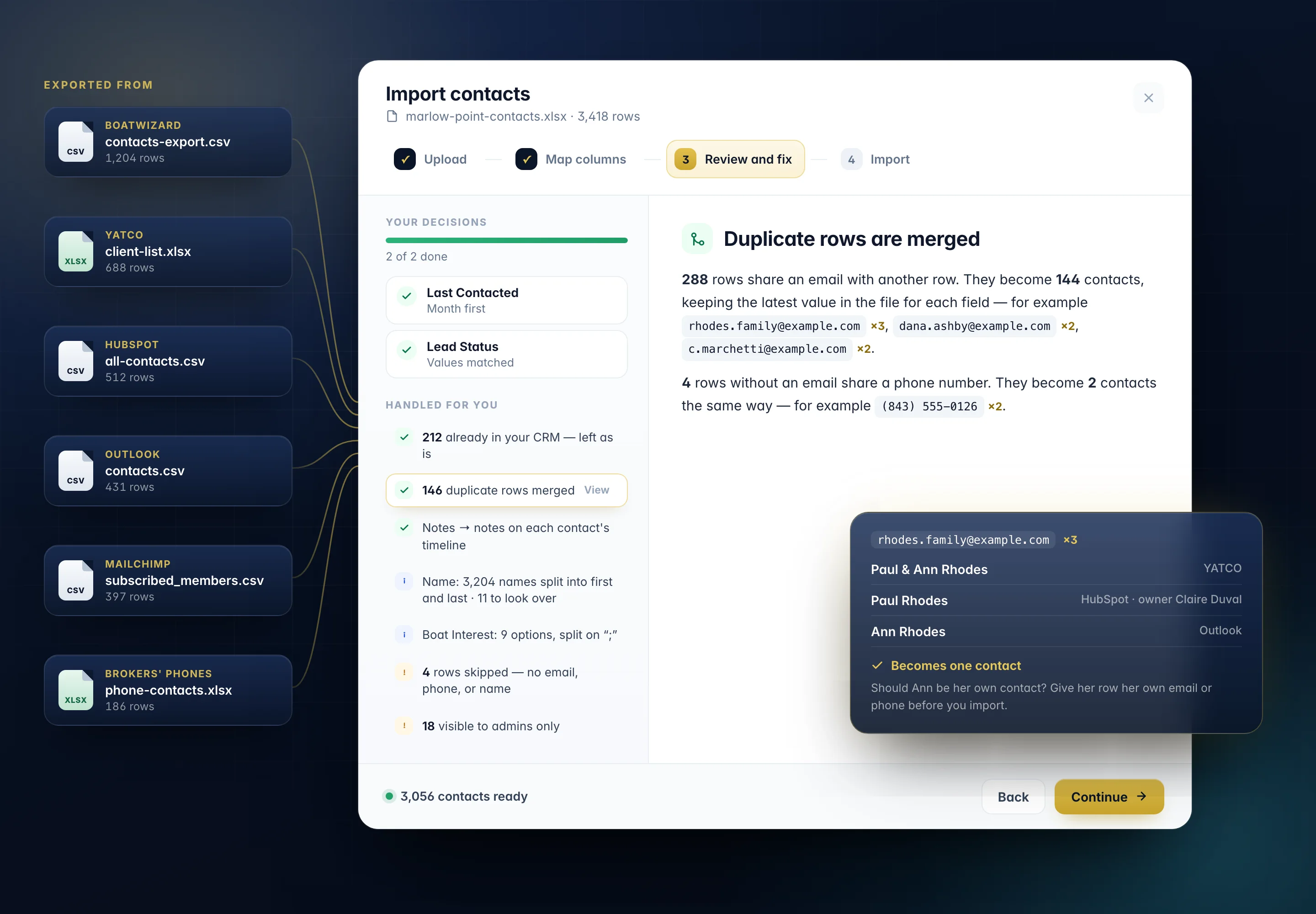
Yes, as long as it gives you an Excel (.xlsx) or CSV export. An admin opens Import contacts on the Contacts page, maps the columns, reviews anything that needs fixing and imports. The file is read in the browser, not uploaded.
Add a column with the broker's email or full name and map it to Owner (broker), and each lead lands with the broker who met them.
Does YachtOne have a booth app or a badge scanner?
No. There is no badge scanning or kiosk mode. On the stand, brokers use Add Contact from a phone browser: a first name and a phone number are enough, with a tag for the show and a note about the boat they stepped aboard. A contact a broker adds is attached to that broker.
Leads from the show organiser's scanner come in afterwards as a spreadsheet import.
How do we keep one show's leads together in the CRM?
Contacts typed in at the stand get a tag, such as Fall Boat Show, and the contacts list filters by tag. Tags aren't brought in by the import, so for a spreadsheet, map a Show column to a custom field and it is kept on every contact.
Straight after an import, View imported contacts opens the list filtered to imported contacts, and the broker filter splits it by who owns each lead.
Someone from the show is already in our CRM. Will the import duplicate them?
No. The import matches every row's email against all of the email addresses on your existing contacts, and anyone it finds is left unchanged rather than duplicated. The review step tells you how many before you import, so a broker can add a note about the show to those clients by hand.
Two rows for the same person inside the file are merged into one. Rows with only a name can't be matched, so don't import the same name-only file twice.
Can we text boat show leads from YachtOne?
No. YachtOne doesn't send text messages. Brokers text from their own phones and log it on the contact as a Text activity, so the next person to open the contact can see it happened.
Can we email every show lead at once from YachtOne?
No. There is no bulk email in YachtOne. Each broker emails their leads one at a time from the contact, through their own connected Outlook mailbox, which is the follow-up that gets read.
For a newsletter, YachtOne can sync new contacts to Mailchimp, Constant Contact or HubSpot, but contacts from a spreadsheet import are not synced automatically. A bulk commercial email also has to meet CAN-SPAM: an accurate subject line, your physical postal address, and a working opt-out honoured within 10 business days.
What does a broker see the morning after the show?
An email of their tasks for the day: how many are overdue, how many are due today and the first two by name, with a link to their activities. Every call-back or email they set a due date on during the show is on it.
Which YachtOne plan covers boat show follow-up?
The Contacts CRM, the import, activities and Outlook email sync come with the $500 a month Website + CRM plan. Giving each broker their own login, so leads and activities are assigned to them and they see their own, is part of the $850 Full Platform.
More problems we solve
Welcome to the First End-to-End Yacht Sales Operating System
We've built the only platform designed specifically for how yacht sales actually happen. From the moment a visitor lands on your site—they never leave your ecosystem.