Yacht Broker Email Marketing Starts With Who May Be on the List.
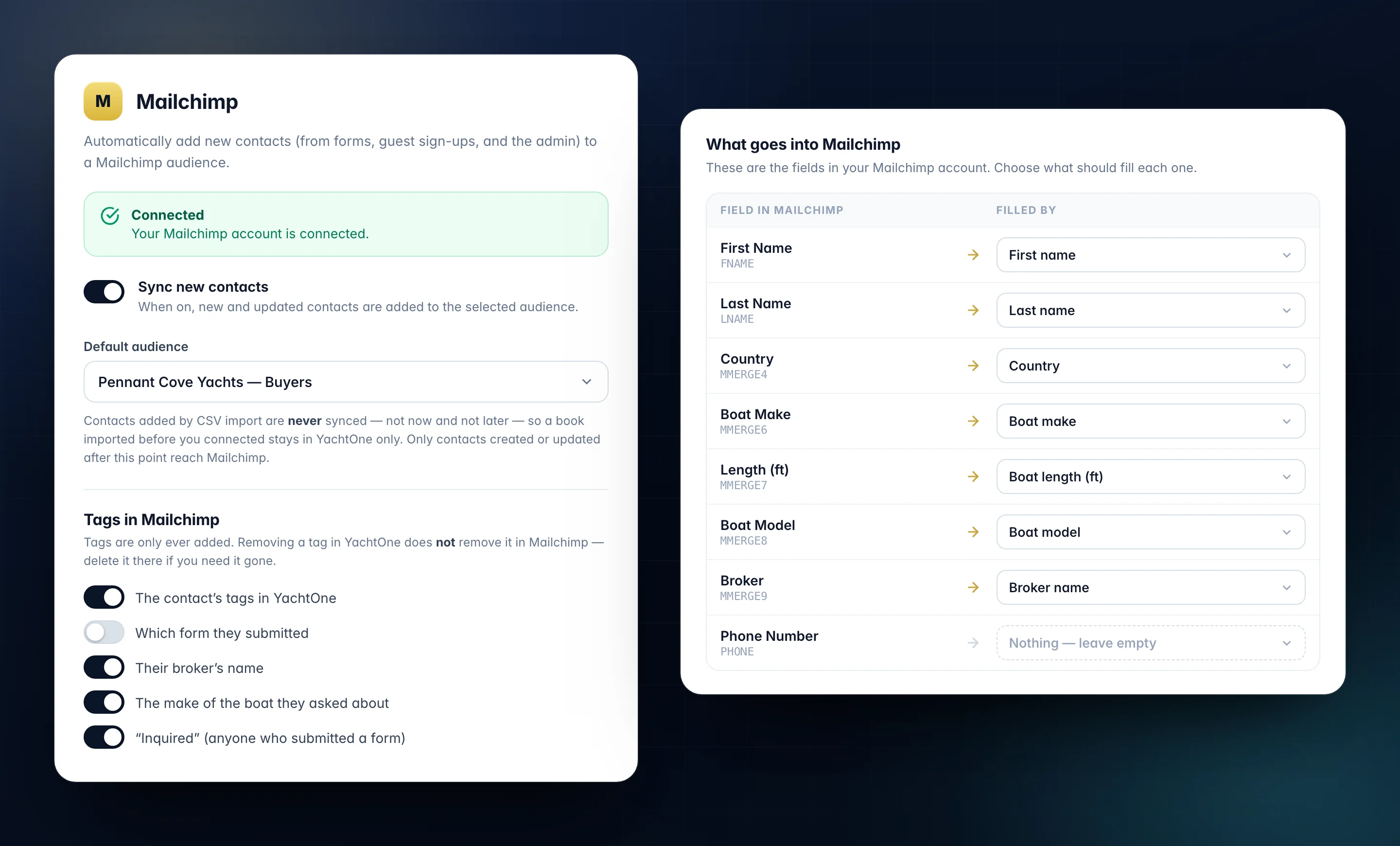
New listings and price drops go out from Mailchimp or Constant Contact. YachtOne keeps that list filled from every inquiry, portal lead and sign-up, carrying the details you choose, and never pushes an old imported spreadsheet or re-subscribes someone who opted out of your Mailchimp list.
- Mailchimp & Constant Contact
- Included from $500 a month
Who sends what, said plainly.
A brokerage emails buyers in three ways. YachtOne sends only one of them itself. For the newsletter, its job is the list.
- One to one
A broker writes to a client
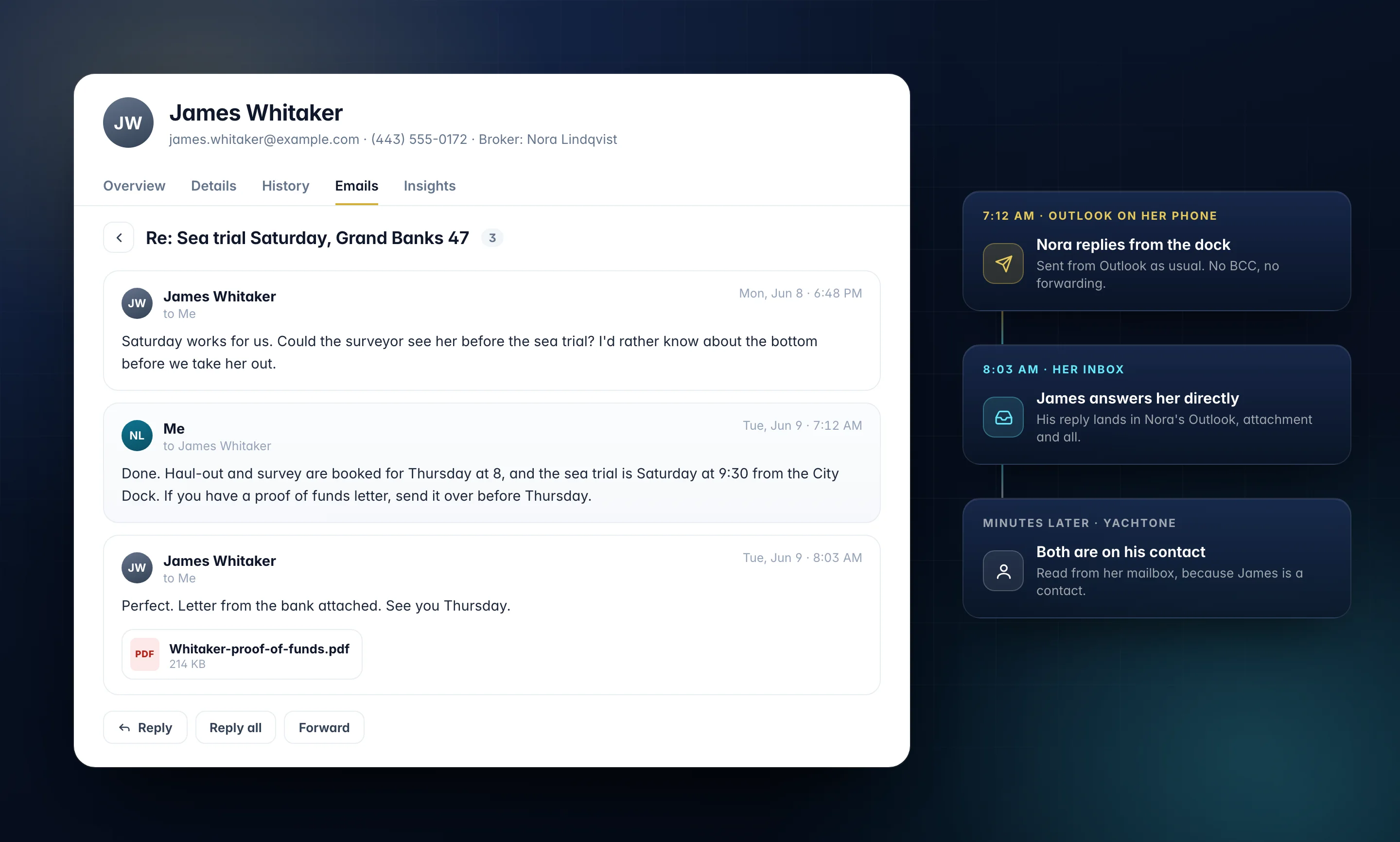
From their own Outlook, as always. With email sync on, the thread is saved on the contact so nobody has to forward it.
Sent byThe broker’s mailboxOutlook email on the contact - One to many
The brokerage mails its list
New this week, price reduced, the boat show invitation. Written and sent in Mailchimp or Constant Contact, to a list YachtOne keeps filled.
Sent byYour Mailchimp or Constant Contact - One buyer, automatically
A buyer’s own alert
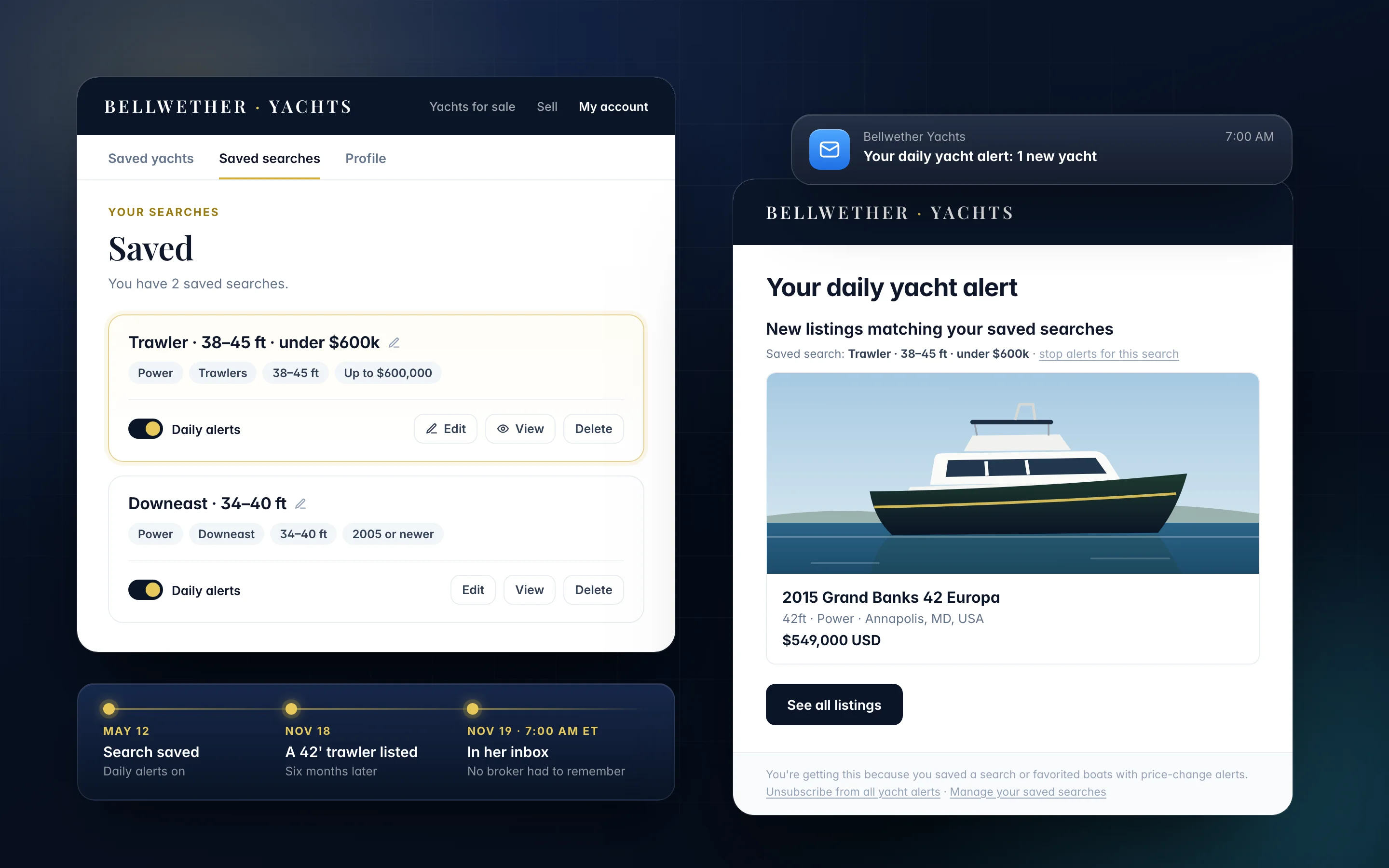
A buyer saves a search on your website and gets one daily email when a match comes in or a favorite drops in price.
Sent byYachtOne, on the buyer’s requestSaved searches and price-drop alerts
Every new buyer on the list, nobody who shouldn’t be.
New contacts join automatically
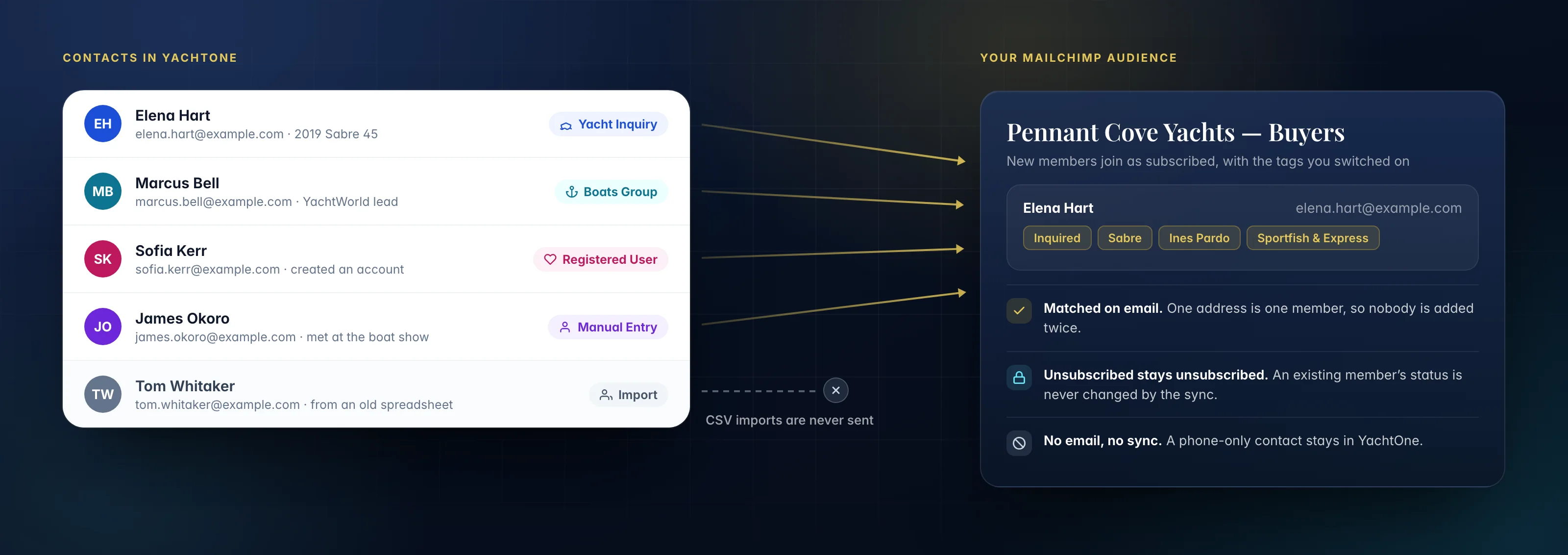
Website inquiries, portal leads, guest sign-ups and people your team adds by hand. A contact is sent again when its name, email or phone changes.
Old spreadsheets stay out
Contacts brought in by CSV import are never sent, so importing a book you haven’t checked for consent never subscribes anyone.
Opt-outs are respected
In Mailchimp, the sync never changes an existing member’s status. A contact marked unsubscribed or spam in YachtOne is skipped.
Details you can segment on
Country, boat make, model and length from the latest inquiry, the broker, your custom fields. In Mailchimp, tags too.
Same contacts, three behaviours.
We switch the integrations on for your brokerage; an admin then connects each account under Settings → Integrations. Mailchimp and Constant Contact can both be connected at once.
Mailchimp
Contacts added to the audience you choose, with mapped fields and optional tags.
An existing member’s subscription status is never changed by the sync.
Constant Contact
Contacts added to the list you choose, with mapped fields.
Its sign-up endpoint records each contact as having given permission, so connect a list kept for buyers who asked to hear from you.
HubSpot
Boat and charter inquiries forwarded to the HubSpot form you choose.
Inquiries only. It doesn’t copy every contact.
What it won’t do
- YachtOne doesn’t write or send newsletters. Your email tool does.
- An unsubscribe made in Mailchimp or Constant Contact isn’t copied back into YachtOne.
- Tags are only ever added. Removing one in YachtOne leaves it in Mailchimp.
- Contacts with no email address, and contacts from a CSV import, stay in YachtOne only.
Everything Else You Might Ask.
Does YachtOne send our new-listing newsletter?
No. YachtOne does not build or send email campaigns. It keeps your Mailchimp or Constant Contact list filled with the right people and the right details, and you send the “new this week” or “price reduced” email from there, with that tool's own templates, scheduling and unsubscribe handling.
The one marketing email YachtOne does send is the buyer's own alert: a buyer who saves a search on your website gets one daily email when a match comes in or a favorite drops in price. That is on the Full Platform plan and is described on the buyer matching page.
Which contacts get added to our Mailchimp audience?
Contacts created in YachtOne after you connect: website inquiries, portal leads from YachtWorld, Boat Trader and the rest, guest sign-ups, and people your team adds by hand. A contact is sent again when its name, email or phone changes.
Contacts brought in by CSV import are never sent, and neither are contacts with no email address. A contact whose record is marked unsubscribed or spam is skipped.
If someone unsubscribed in Mailchimp, will the sync add them back?
No. For someone already in the audience, the sync updates their details but never changes their subscription status, so an unsubscribed member stays unsubscribed even if they inquire again. The unsubscribe is not copied back into YachtOne, so keep Mailchimp as the place that decides who receives marketing email.
How is Constant Contact different?
Contacts are added to the list you pick through Constant Contact's sign-up form endpoint, which Constant Contact documents as recording that the person gave you permission to email them, and which can change the status of someone who had unsubscribed. So connect the list you keep for buyers who asked to hear from you, not your whole book. Tags are a Mailchimp option only.
Can we send trawler listings only to trawler buyers?
Yes, by segmenting in Mailchimp or Constant Contact on what the sync sends. You choose which YachtOne field fills each field in your account: country, boat make, model and length from the buyer's latest inquiry, the broker's name, your own custom fields and more. In Mailchimp you can also switch on tags for the contact's YachtOne tags, their broker, the make of boat they asked about and an “Inquired” marker. Tags are only ever added, never removed.
Can I email a buyer who inquired through YachtWorld?
It depends on where the buyer lives, not where your office is. Under CASL in Canada, an inquiry gives you implied consent for six months. In the UK, PECR's soft opt-in covers someone who bought or negotiated to buy something similar from you, but only if they were offered an opt-out when you took their details. In the US, CAN-SPAM does not ask for permission first but sets rules for every email, including honouring an opt-out within 10 business days.
This is general information, not legal advice. The sources are linked on this page.
What does the HubSpot connection do?
It forwards boat and charter inquiries from your website to a HubSpot form you choose, as form submissions, with the boat and broker details you map. It does not copy every contact the way the Mailchimp and Constant Contact sync does.
How do we know the sync is working?
Once you pick an audience or list, press Send a test contact. It adds one clearly labelled test contact so you can find it in your account, then delete it. If a sync ever fails, the last error shows on that integration's card in Settings.
Which plan includes the Mailchimp and Constant Contact sync?
Website + CRM, at $500 a month, and the Full Platform at $850, which adds the buyer's saved-search alerts. We switch the integrations on for your brokerage, then an admin connects the account under Settings → Integrations.
More problems we solve
Welcome to the First End-to-End Yacht Sales Operating System
We've built the only platform designed specifically for how yacht sales actually happen. From the moment a visitor lands on your site—they never leave your ecosystem.